

You sit down to work, and ten minutes later you are leaning toward the screen with your shoulders creeping up. Most of us have been there. Desk posture tends to drift during long hours of emailing, studying, or video calls, usually without us noticing.
Knowing how you are supposed to sit is only part of the picture. A NIOSH-supported study of workstation behavior found that training alone did not change how participants set up their workstations, while a motivational incentive did. Information is helpful, but habits depend on your environment, your routines, and the small cues around you.
This guide takes a practical, habit-first approach. Instead of asking you to hold a rigid position all day, it shows you how to make a comfortable workstation, regular movement, and simple reminders part of your everyday routine. You will find 10 steps, a daily routine, a printable checklist, and answers to common questions.
Why Good Desk Posture Habits Matter
Good desk posture habits are about comfort and variety, not perfection. Our article on the benefits of good desk posture covers the “why” in more depth, and our evidence review, does desk posture actually work, explains what research can and cannot tell us. Here is the short version.
Supports Everyday Sitting Comfort
A well-adjusted chair and desk reduce unnecessary strain on your neck, shoulders, and back. The U.S. Occupational Safety and Health Administration (OSHA) describes a “neutral” working position as one in which your joints are naturally aligned and your forearms are roughly parallel to the floor, according to its Computer Workstations eTool. Comfort varies from person to person, so use these ideas as a starting point.
Encourages Better Workplace Ergonomics
Your setup shapes your behavior. When the monitor sits at a comfortable height, the keyboard is within easy reach, and the chair supports your back, a relaxed position becomes the easy default. When the setup is awkward, you will drift into awkward positions no matter how motivated you are.
Promotes Regular Movement
OSHA also notes that working in the same posture or sitting still for long periods is not healthy, no matter how good the posture looks. That is why this article treats movement as part of good desk posture. A 2021 trial in the Scandinavian Journal of Work, Environment & Health found that encouraging active breaks or postural shifts was linked to fewer new cases of neck and low back pain among high-risk office workers. This does not mean posture habits prevent pain for everyone, but it supports moving often.
Why Poor Desk Posture Becomes a Habit
Slouching rarely comes from carelessness. It develops from routines and surroundings that quietly reward it. For a broader look at causes, see what causes poor posture.
Spending Too Much Time in One Position
Computer work encourages long stretches of sitting. When you are absorbed in a task, you stop noticing how you are positioned. Research on office workers suggests that desk-based employees may sit for up to 82% of their working hours.
Poor Workstation Setup
A desk that is too high, a chair without back support, or a laptop screen that sits low all invite awkward positions. Equipment that is inconvenient to reach pulls you forward or twists you sideways, and your body adapts to whatever you give it.
Lack of Reminders and Awareness
When deadlines are close, posture is the first thing to be forgotten. Without visual cues or built-in prompts, there is nothing to bring your attention back to how you are sitting.
Repeating the Same Daily Routine
Repeated actions become automatic, including the ones you would rather change. If you have worked at the same setup for years, a new position can feel strange at first. That “awkward” feeling is normal and often fades with practice.
10 Ways to Build a Good Desk Posture Habit
Start with the first few steps, then add more over time. You do not need to do all ten at once.
1. Start by Understanding Your Natural Sitting Position
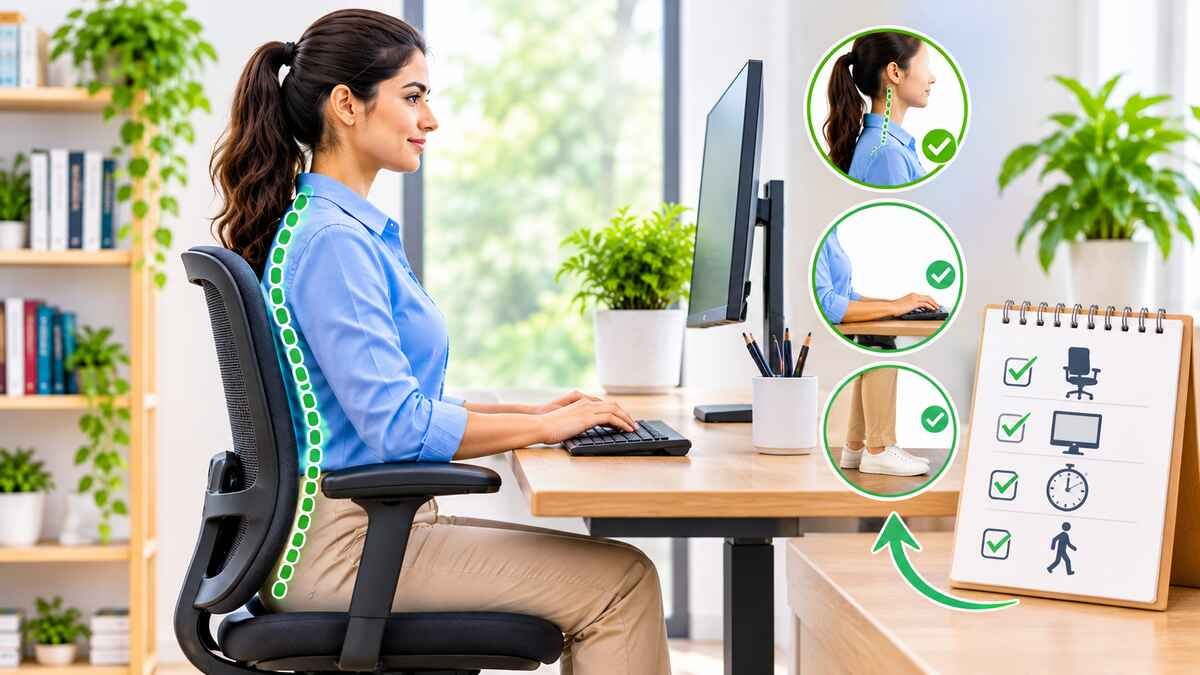
Notice what a comfortable, neutral position feels like for you. Your shoulders should feel relaxed, your back should be supported by the chair, and your feet should rest on the floor or a footrest. Avoid forcing yourself into a stiff, military-style posture, since that is hard to sustain and can create its own tension.
2. Create an Ergonomic Workspace
Adjust your chair to a comfortable height and place your monitor directly in front of you, with the top of the screen at or slightly below eye level. Keep your keyboard and mouse close enough that your elbows stay near your sides. Organize the items you use most within easy reach, so you are not twisting or stretching all day. A comfortable environment makes healthy habits easier to repeat.
3. Begin With Small Daily Changes
Trying to change everything at once usually backfires. Pick one adjustment, such as raising your monitor or placing a small footrest, and practice it every day for a week or two. Once it feels automatic, add another.
4. Use Daily Reminders
Occasional prompts can help. Try a sticky note near your monitor, a calendar reminder, or a gentle timer. Keep reminders occasional rather than constant, because frequent alerts are easy to tune out and can become frustrating.
The research is mixed on this point. In an IOSH-funded study of 195 office workers, a hourly buzzer alone did not significantly increase break taking, according to press coverage of the findings. Planning breaks in advance did produce a meaningful increase in postural changes. Reminders work best when paired with a plan.
5. Connect Posture Checks With Existing Habits
This is called habit stacking: you attach a new behavior to something you already do. For example:
- Check your sitting position when you start your computer.
- Relax your shoulders before a meeting begins.
- Review your workstation when you return from a break.
- Reposition your feet before starting a new task.
These if-then plans are the same kind of planning used in the IOSH study above.
6. Take Regular Movement Breaks
Stand up, walk to get water, or stretch for a minute or two. Change positions throughout the day instead of holding one “perfect” posture. If you want a longer-term goal, our guide to walking for health offers easy ways to add more steps to your day.
7. Practice Good Desk Habits During Short Sessions
Start with a 20 or 30 minute focus session, such as answering emails or reading. Practice your comfortable position there first, then carry the same habits into longer work or study blocks. Focus on consistency, not perfection.
8. Track Your Progress
A simple habit tracker can show you what is working. Mark whether you adjusted your workstation and whether you took movement breaks. Celebrate showing up, not flawless days.
9. Make Your Workspace Encourage Healthy Behavior
Design your space so the healthy choice is the easy one. Keep frequently used items within reach, leave a clear path to walk, and put your water bottle across the room if that helps you get up. A sit-stand desk can help if you have one, but it is not a complete solution. A qualitative study of office workers noted that access to a height-adjustable desk does not necessarily mean people use it to alternate between sitting and standing.
10. Be Patient and Consistent
New habits take time, and the timeline differs from person to person. If you forget a posture check or skip a day, simply start again at the next opportunity. Sustainable improvement comes from repetition, not from guilt.
How to Create a Daily Desk Posture Routine
A routine turns good intentions into automatic behavior. Adapt the following to your own schedule. For more ideas on building routines, see our guide to healthy habits.
Before Starting Work or Study
- Adjust your chair so your feet are supported.
- Check that your monitor is directly in front of you.
- Place your keyboard and mouse within easy reach.
During Work or Study
- Notice whether your shoulders are relaxed.
- Change your position every so often rather than staying still.
- Take short movement breaks, even a minute or two of standing and walking.
After Completing Work
- Stand up and move around.
- Think about which habits felt easy to keep.
- Choose one small improvement for tomorrow.
A Simple Daily Habit Checklist
Copy this list into a notes app or print it for your desk. Check off each item as you go.
- [ ] Check chair and back support
- [ ] Position monitor comfortably
- [ ] Relax shoulders and arms
- [ ] Keep feet supported
- [ ] Take regular movement breaks
- [ ] Change sitting position periodically
- [ ] Review workstation before finishing
Aim for progress over the week, not 7 out of 7 every day.
Common Mistakes That Prevent Consistency
Most people who give up on desk posture do so for understandable reasons. Watch for these.
Trying to Change Everything at Once
Ten new habits can feel overwhelming and are hard to sustain. Choose one or two manageable adjustments first.
Relying Only on Posture Reminders
Alerts alone rarely change behavior. Combine them with a better workstation and a plan for when you will move.
Expecting Perfect Posture
No one sits perfectly for eight hours, and you do not need to. Comfortable movement and frequent position changes matter more than holding a single ideal shape. If you already struggle with ongoing slouching, our guide to relieving poor posture at home offers gentle starting points.
Ignoring Workstation Comfort
A chair that does not fit or a screen that sits too low will undermine your best efforts. If your equipment is the problem, adjust the equipment first.
Giving Up After Missing a Day
Occasional gaps are normal. Return to your routine the next day without self-criticism.
How to Maintain Your Desk Posture Habit Long-Term
Make Healthy Habits Convenient
Keep your workstation arranged properly, make breaks easy to take, and leave simple visual cues in place. The less effort a good habit requires, the longer it lasts.
Review Your Progress Regularly
Every few weeks, ask which habits feel easy and which still feel hard. Look for workstation problems, and adjust when your routine changes, such as a new job, a new desk, or a switch to remote work.
Focus on Flexibility Rather Than Perfection
Avoid forcing a single position. Keep moving, and adapt your routine to the demands of your work or study schedule.
The evidence on workplace break programs is still developing. A 2025 Japanese study found that scheduled short active breaks reduced sitting time at work over a year, but the authors noted methodological limitations and called for further research. Use these findings as encouragement to experiment, not as a guarantee.
When discomfort lasts or worsens, a workstation change may not be enough. Persistent pain, numbness, or tingling deserves a conversation with a healthcare professional. You can learn more about what causes back pain and gentle exercises for lower back pain in our related guides.
Frequently Asked Questions About Desk Posture
1. How do I develop a habit of good desk posture?
Start with one small workstation adjustment, such as raising your monitor. Add occasional reminders and link posture checks to things you already do, like starting your computer or returning from a break. Build up gradually.
2. How long does it take to build a desk posture habit?
There is no guaranteed number of days. Habit formation varies between people and behaviors, and a supportive environment and consistent practice matter more than a deadline. Missing a day does not reset your progress.
3. How can I remember to maintain proper desk posture?
Use visual cues, such as a sticky note near your screen, and pair posture checks with routine moments. For example, check your position whenever you begin a new work session. Planning these moments in advance tends to work better than relying on memory.
4. Can an ergonomic chair help improve desk posture habits?
A well-adjusted ergonomic chair can make a comfortable position easier to maintain. It does not replace regular movement or awareness of your workstation. Fit matters, so adjust the chair to your body.
5. Should I correct my posture every few minutes?
No, constant self-monitoring is not necessary and can feel tiring. Make occasional adjustments and change positions naturally through the day. OSHA guidance emphasizes frequent changes in working position over holding one fixed posture.
6. What is the most important habit for healthy desk posture?
A practical starting point is combining a comfortable workstation with regular movement and position changes. If you can only do one thing, take short breaks to stand and move. Individual needs vary, so adjust to what feels comfortable.
Conclusion
Healthy desk posture is built through small, repeated actions, not strict rules. A comfortable workstation, a few well-placed reminders, habit stacking, and regular movement are enough to start. Be patient with yourself, especially in the first few weeks.
Pick one change today, such as adjusting your screen height or setting a break reminder. Over time, comfortable desk habits can become a natural part of your everyday life.
Sources
- Occupational Safety and Health Administration (OSHA): Computer Workstations eTool, Good Working Positions
- CDC Stacks / NIOSH: Implementing Movement at the Workplace (Pronk, 2021)
- IOSH: Move More, Investigating the Impact of Behaviour Change Techniques
- Personnel Today: coverage of the IOSH and University of Derby study
- PubMed Central: Perceived Barriers and Facilitators to Breaking Up Sitting Time Among Desk-Based Office Workers (Ojo et al., 2019)
- PubMed Central: Motivating Ergonomic Computer Workstation Setup, Sometimes Training Is Not Enough (Sigurdsson et al.)
- Scandinavian Journal of Work, Environment & Health: Effects of an active break and postural shift intervention on neck and low-back pain (Waongenngarm et al., 2021)
- Scandinavian Journal of Work, Environment & Health: Effectiveness of short active breaks among Japanese office workers (Kitano et al., 2025)
This article is for general educational purposes only and is not medical advice. It does not diagnose, treat, or replace guidance from a qualified healthcare professional who knows your health history. If you have ongoing pain, numbness, tingling, weakness, or any symptom that worries you, please talk with a doctor or other licensed provider. If you think you may be having a medical emergency, contact your local emergency number right away.