

Ergonomic chairs, standing desks, posture reminders, and endless advice to “sit up straight” are everywhere. Millions of people spend most of their workday at a computer, so it makes sense to ask whether desk posture really matters. Does sitting correctly make a meaningful difference, or is it another health recommendation that has been oversimplified?
The short answer is that research suggests ergonomic improvements can help, especially with comfort and with how people sit, but the results depend on the person and the workplace. Desk posture is not a guaranteed fix for back or neck pain. It also does not mean holding one perfect position for eight hours.
This article looks at what desk posture actually means, what the evidence says, and which myths are worth dropping. You will also find practical habits that are genuinely worth adopting. If you want the benefits explained first, see our guide to the benefits of good desk posture.
What Does Desk Posture Actually Mean? Understanding Proper Desk Posture
Desk posture is the way you position your body while working or studying at a desk. In everyday language, “good” desk posture means a comfortable, supported position that does not force your body into awkward angles.
Understanding Proper Desk Posture
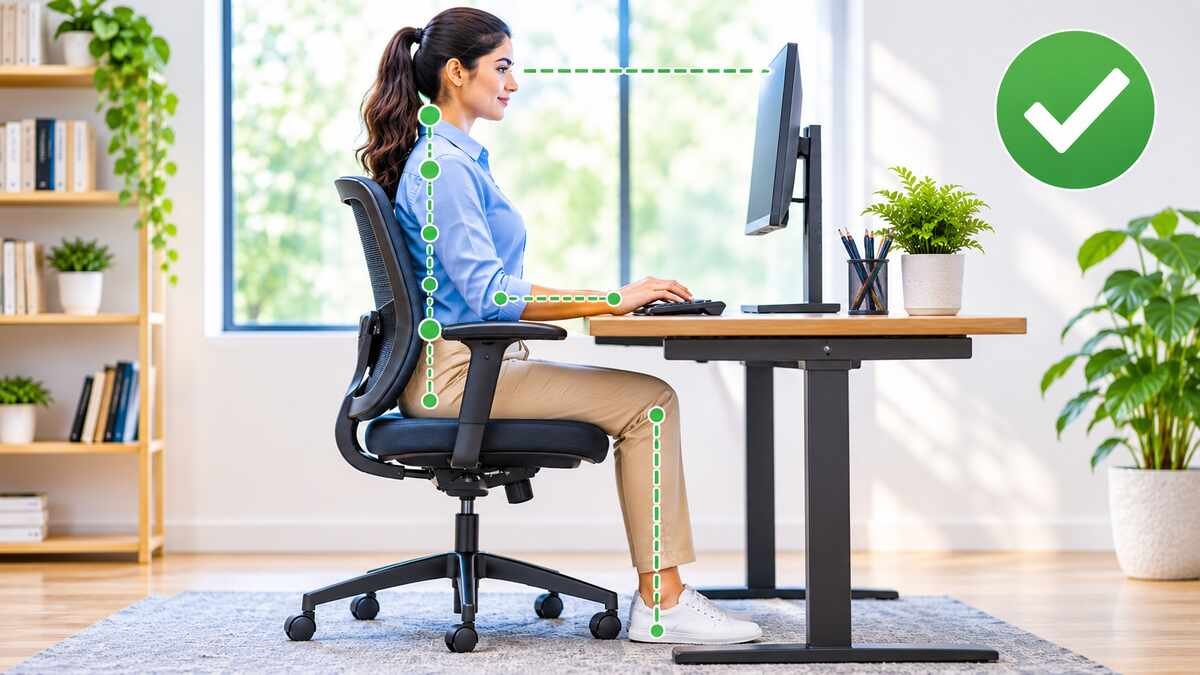
The European Agency for Safety and Health at Work (EU-OSHA) describes a neutral posture as one where joints are naturally aligned and relaxed. Seated, that usually means your back is supported, your shoulders are relaxed, and your elbows stay near your body at about 90 degrees. Your head sits level or slightly forward, your wrists are fairly straight, and your feet rest on the floor or a footrest.
There is no single perfect position for everyone. Body size, the task you are doing, and your own comfort all matter. A position that suits a tall person using a laptop may not suit a shorter person using a large monitor.
The Role of Workplace Ergonomics
Ergonomics is the science of fitting the workplace to the person. Chair design, desk height, monitor placement, and keyboard position all shape how you sit. A chair that supports the natural inward curve of your lower back, a screen at a comfortable height, and a keyboard within easy reach can make everyday work less tiring.
CDC and NIOSH guidance recommends placing the monitor about an arm’s length away with the top at or below eye level, keeping wrists neutral, and supporting the low back. These are sensible starting points that you can adjust to your body.
Does Desk Posture Actually Work?
This is the central question, and the honest answer is “yes, in some ways, with limits.” The sections below separate what desk posture can reasonably do from what it cannot.
Can Good Desk Posture Improve Comfort?
Often, yes. When your workstation fits you, there is less reaching, craning, and twisting, which may reduce unnecessary physical strain. A cluster randomized trial of 61 office workers found that personalized workstation adjustments reduced head and upper back flexion and lowered perceived discomfort compared with no intervention. Individual experiences still differ, and a small trial cannot speak for everyone.
Can Proper Desk Posture Prevent Back and Neck Pain?
This is where claims often go too far. Staying in one position for a long time can contribute to discomfort, and ergonomic adjustments may help some computer users. But posture alone cannot guarantee that pain will be prevented or treated.
EU-OSHA notes that office work often aggravates existing musculoskeletal problems more than it directly causes them. Back and neck pain have many possible contributors, including activity levels, stress, sleep, and previous injuries. For background, see our guide on what causes back pain.
Does Sitting Correctly Improve Productivity?
Physical discomfort can be distracting, so a comfortable setup may help people focus. However, the evidence for a direct productivity benefit is weak. A scoping review of sit-stand desks found that only a small share of results showed improved work performance. Good posture does not automatically improve concentration or output.
Is Desk Posture Worth Paying Attention To?
Yes, as long as expectations stay realistic. Posture awareness encourages you to adjust your workstation and to change position more often. The most useful takeaway is to favor movement and flexibility over rigid sitting.
Key message: Desk posture can make a meaningful difference to comfort and working conditions, but it is not a guaranteed solution for every health problem.
What Does Scientific Research Say About Desk Posture?
Research on desk posture looks at three different outcomes, and it helps to keep them apart:
- Whether workplace changes improve sitting posture
- Whether they reduce time spent sitting
- Whether they improve pain, discomfort, or other health outcomes
An improvement in one does not automatically mean an improvement in the others.
Research on Workplace Posture Improvements
A 2017 systematic review in Preventive Medicine examined 12 studies with about 1,200 participants. Most studies showed medium to large improvements in overall sitting posture, although results for specific body segments were mixed. The authors rated the certainty of the evidence as low or very low and could not pool the results.
So ergonomic interventions may improve how people sit, but the evidence is limited. Studies differ in design, workplace, and how posture was measured, which is one reason results vary.
What Research Says About Sit-Stand Desks
Sit-stand desks let workers alternate between sitting and standing. A Cochrane review of 20 studies found that sit-stand desks were associated with sitting roughly 30 minutes to 2 hours less during the working day. The quality of evidence was low or very low, and the review concluded that health benefits remain unproven. The authors also noted that standing hardly increases energy use, so these desks should not be expected to aid weight loss.
A scoping review of 53 articles reached a similar conclusion. Sit-stand desks changed sitting and standing behavior fairly consistently, but the authors said these changes only mildly affected health outcomes. Discomfort was the area where the desks were most often effective.
Reduced sitting time is not the same as better health, productivity, or pain relief. It is a useful change that still needs better evidence behind it.
Why More Research Is Needed
Studies differ in length, participants, and the equipment they test. Short-term improvements do not prove long-term benefits. In the BMJ trial of 756 office workers, a workplace program reduced sitting, and a height-adjustable desk reduced it further. Yet the authors noted that the health benefits remain uncertain, and blood pressure did not differ between groups.
Individual needs matter too. Two people at identical desks may need very different adjustments, so the research is best treated as a guide, not a rulebook.
How to Read the Evidence Sensibly
It helps to keep a few points in mind when you see bold claims about posture:
- Low certainty does not mean “doesn’t work.” It means we cannot be confident about the size of the effect, and better studies could change the picture.
- Small, short studies are common. The workstation adjustment trial above followed 61 people for three months, which is useful but limited.
- Comfort is subjective. Perceived discomfort is a real outcome for the person feeling it, but it can also be influenced by expectations.
- Different outcomes tell different stories. A change in sitting angle, a change in sitting time, and a change in pain are three separate questions.
Taken together, the sensible reading is that workstation adjustments and movement are low-risk, low-cost habits with reasonable support for comfort, while claims about preventing disease or curing pain go beyond what the evidence shows.
Real Benefits of Improving Desk Posture
The benefits below are realistic and evidence-informed, not guaranteed outcomes.
1. Better Everyday Sitting Comfort
Appropriate chair and desk adjustments can make long sessions more comfortable. Supported feet, back support, and enough legroom help you avoid shifting restlessly or perching on the edge of your seat.
2. Reduced Unnecessary Neck and Shoulder Strain
Monitor height matters. When the screen is too low or too far, your head drifts forward and your shoulders tense. Placing it at a comfortable height and keeping your shoulders relaxed may reduce this strain.
3. More Comfortable Lower Back Support
A chair that supports the natural curve of your lower back can make sitting more comfortable. Prolonged static positions can contribute to discomfort, so regular changes of position matter as much as the chair itself. Our guide to exercises for lower back pain offers gentle ideas.
4. Better Wrist and Arm Positioning
Keeping the keyboard and mouse within easy reach and your wrists fairly straight avoids unnecessary reaching and bending. This is simple to do and costs nothing.
5. More Awareness of Movement Habits
Paying attention to posture often leads people to move more. Short movement breaks, standing for part of the day, and brief walks all help. NIOSH research found that adding hourly five-minute breaks reduced musculoskeletal discomfort and eyestrain.
Common Desk Posture Myths
Myth 1: You Must Sit Completely Straight All Day
Reality: Comfortable posture involves flexibility. EU-OSHA stresses that good posture alone is not enough and that changing position regularly is important. Holding one rigid position continuously is unnecessary.
Myth 2: An Expensive Ergonomic Chair Fixes Everything
Reality: A well-designed chair can help with comfort, but it works best when it is adjusted properly and paired with good workstation setup and movement habits. A costly chair that is set up badly may help little.
Myth 3: Standing All Day Is Better Than Sitting
Reality: Prolonged standing can also be uncomfortable. Alternating between sitting, standing, and walking is more practical. The Cochrane review found that standing more did not cause harms such as musculoskeletal pain in the studies reviewed, but evidence for clear benefits is limited.
Myth 4: Poor Posture Always Causes Back Pain
Reality: Back discomfort has multiple contributing factors. Posture is one possible influence, not the only one. If you are worried, our article on whether you should worry about poor posture can help put it in context.
Myth 5: There Is One Perfect Desk Posture
Reality: Comfortable positioning varies between individuals and tasks. You do not need to sit at a perfect 90-degree angle at all times. Experiment within neutral, supported positions and notice what feels sustainable.
How to Improve Your Desk Posture
You can make meaningful improvements without buying expensive equipment.
1. Adjust Your Chair
Use comfortable back support, and keep your feet resting on the floor or a footrest. Adjust the seat so you can sit back comfortably while reaching the desk. Avoid soft sofas for long work sessions.
2. Position Your Monitor Correctly
Place the screen directly in front of you at a comfortable viewing height, about an arm’s length away. Avoid repeatedly leaning forward. If text is hard to read, increase the font size instead of moving closer.
3. Keep Your Keyboard and Mouse Within Reach
Position frequently used equipment so your elbows stay near your body. Avoid excessive reaching, and keep your wrists and shoulders relaxed. When using a laptop for long periods, an external keyboard helps.
4. Take Regular Movement Breaks
Stand and move periodically, walk during suitable breaks, and change your sitting position throughout the day. Our guides on walking for health and how many steps a day you should walk offer more ideas. NIOSH also describes the 20-20-20 rule to ease eye strain: every 20 minutes, look at something about 20 feet away for 20 seconds. See also our article on dry eye symptoms.
5. Create a Comfortable Workstation
Improve lighting and reduce screen glare by placing your screen at a right angle to windows. Organize desk accessories so the items you use most are easy to reach. Then make adjustments based on how your body feels, one change at a time.
If you already have aches from desk work, gentle suggestions are available in our guide on how to relieve poor posture at home.
Where to Start If You Only Have Five Minutes
You do not need to change everything at once. If you want the biggest return for the least effort, try this order:
- Raise or lower your screen so the top sits at or just below eye level.
- Bring your keyboard and mouse closer so your elbows rest near your body.
- Support your feet with the floor or a sturdy footrest.
- Set a gentle reminder to stand up or shift position about once an hour.
Notice how your body feels for a week before making further changes. If a change feels worse, undo it and try something different. Comfort is the best guide, because the right setup is the one you can maintain.
Does Sitting Upright All Day Help?
Not really. Sitting upright continuously is not necessary, and rigid posture rules have limits. What matters more is the difference between maintaining a comfortable position and avoiding movement. Even a good position becomes tiring if you hold it for hours.
EU-OSHA identifies long periods of static sitting as a risk factor and recommends changing position regularly, such as alternating between sitting and standing. Doing so can also reduce prolonged sitting time. Regular movement is more useful than obsessing over a single posture.
A practical approach is to aim for a comfortable, supported position, then shift, stand, stretch, or walk before discomfort builds. To support that routine, see our guides on how to improve flexibility and the benefits of exercise.
Frequently Asked Questions About Desk Posture
1. Does desk posture actually work?
Yes, appropriate workstation positioning can improve sitting comfort and help reduce unnecessary physical strain. However, it is not a guaranteed solution for pain or other health conditions. A 2017 systematic review found improved sitting posture in most studies, but the certainty of the evidence was low.
2. Can desk posture improve back pain?
Ergonomic adjustments may improve comfort for some people, but back pain has multiple possible causes. If pain is persistent or severe, speak with a healthcare professional. Our guide on when poor posture is an emergency explains warning signs.
3. Is sitting straight all day healthy?
No single sitting position needs to be maintained all day. Regular movement and comfortable position changes are important, as EU-OSHA emphasizes.
4. Do ergonomic chairs really make a difference?
They can improve support and comfort, especially when properly adjusted to the user’s body and tasks. A chair is one part of the workstation, so it works best with good monitor and keyboard placement and regular movement.
5. Is standing better than sitting at a desk?
Both positions have advantages and limitations. Alternating between sitting, standing, and walking is a practical approach. A Cochrane review found that sit-stand desks reduced sitting time, but proven health benefits were lacking.
Conclusion
Desk posture does work in a practical sense. Ergonomic adjustments can improve how you sit and how comfortable you feel, even though the evidence for pain prevention and wider health benefits is still limited. Good posture is not about rigid positioning, so focus on a comfortable workstation, regular movement, and changing positions.
Make small, sustainable improvements to your desk habits, and talk with a healthcare professional if discomfort persists. For more ideas, explore our guide on healthy habits.
Sources
- Centers for Disease Control and Prevention, NIOSH. Working from Home: How to Optimize Your Work Environment and Stay Healthy
- European Agency for Safety and Health at Work (EU-OSHA). Ergonomics in Office Work
- Workplace interventions to improve sitting posture: a systematic review. Preventive Medicine. 2017.
- The effect of sit-stand desks on office worker behavioral and health outcomes: a scoping review. Applied Ergonomics. 2019.
- Cochrane. Health effects of sit-stand desks and interventions aimed at reducing sitting at work are still unproven
- Effects of workstation adjustment to reduce postural exposure and perceived discomfort among office workers: a cluster randomized controlled trial. Applied Ergonomics. 2022.
- Effectiveness of an intervention for reducing sitting time and improving health in office workers: three arm cluster randomised controlled trial. The BMJ. 2022.
Medical Disclaimer: This article is for general information and education only. It is not medical advice, and it does not replace care from a doctor or other qualified health professional. Ergonomic needs differ from person to person, and no single sitting position works for everyone. Talk with a healthcare professional if you have ongoing pain, numbness, tingling, or weakness, or if your symptoms are getting worse.
1 thought on “Does Desk Posture Actually Work? What Science Says About Sitting Correctly”
Comments are closed.