

If you work, study, or game at a computer, you probably spend hours in one spot. Many people notice a stiff neck, tight shoulders, or an aching lower back by the end of the day. Desk posture, meaning how you position your body while you work, plays a role in how comfortable those hours feel.
Office workers, students, and remote workers all face the same challenge: modern work keeps us seated and focused on screens. A comfortable, well-supported position can make desk activities easier on your body and reduce unnecessary strain. Good posture is not a cure-all, but it is one of the simplest things you can adjust.
This guide covers what good desk posture looks like, ten potential benefits, common mistakes, and practical setup tips. One idea runs through all of it: good posture is not about holding one rigid position all day. Regular movement and posture changes matter just as much.
What Is Good Desk Posture? Understanding Proper Desk Posture
Good desk posture means setting up your workspace so your body can rest in a comfortable, relaxed position while you work. It is closely linked to ergonomics, the practice of fitting the workstation to the person instead of forcing the person to fit the workstation.
Understanding Neutral Body Position
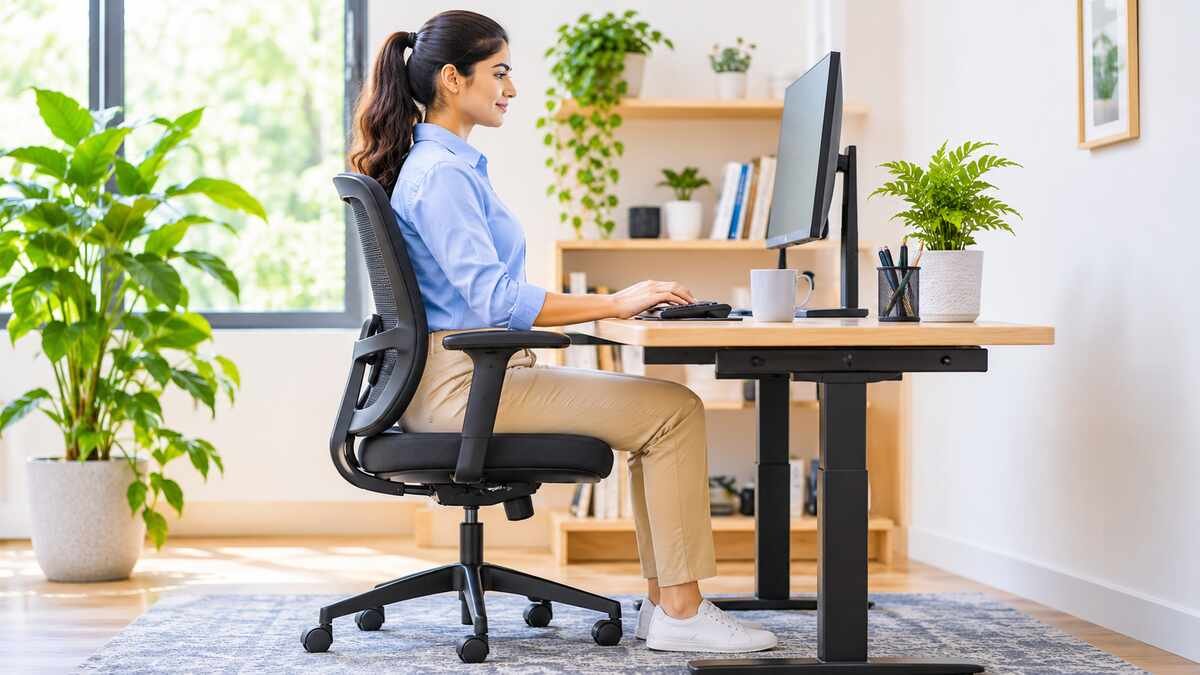
The European Agency for Safety and Health at Work (EU-OSHA) describes a neutral posture as one in which joints are naturally aligned and relaxed, which reduces strain on muscles, tendons, and the skeleton. When seated, this typically means:
- Your back is supported, following the natural curves of the spine
- Your shoulders are relaxed, and your elbows stay near your body at about 90 degrees
- Your head is balanced over your torso, not pushed far forward
- Your wrists and forearms are fairly straight
- Your hips, knees, and feet are comfortably supported, with feet resting on the floor or a footrest
Neutral does not mean stiff. A relaxed, upright position is more sustainable than a rigid, “perfect” one.
Why Desk Ergonomics Matters
Your workstation strongly influences how you sit. Chair height, desk height, keyboard placement, and monitor position all affect how much you reach, lean, or twist. The goal is to adjust the setup to your body, since needs vary with height, build, and the tasks you do.
10 Important Benefits of Good Desk Posture
Research on desk posture is still developing, and no single position prevents every musculoskeletal problem. The benefits below describe how comfortable positioning may help, not guaranteed outcomes.
1. Helps Reduce Neck and Shoulder Discomfort
When your head drifts forward to see a screen, your neck and shoulder muscles work harder to hold it up. Placing your monitor at a comfortable height and distance can reduce that effort. Relaxed shoulders also make typing and mouse use more comfortable.
2. Supports Natural Spinal Alignment
The spine has gentle natural curves. An ergonomic chair with appropriate back support can help you sit in a way that respects those curves instead of flattening or exaggerating them. CDC and NIOSH guidance suggests supporting the low back’s natural inward curve, using a lumbar pad or roll if your chair is flat.
3. Helps Reduce Lower Back Discomfort
Sitting in one position for a long time, especially without back support, can contribute to lower back discomfort. Lumbar support and a well-fitted chair can help. Changing positions regularly matters too. For related reading, see our guides on what causes back pain and exercises for lower back pain.
4. Improves Everyday Working Comfort
Small adjustments can make a big difference to how a workday feels. Enough legroom, supported feet, and items within easy reach help you avoid awkward reaching and twisting. Comfortable workstations tend to feel less tiring.
5. May Support Better Concentration
Physical discomfort can pull your attention away from your work. A comfortable setup may reduce those distractions and make it easier to stay focused. That said, posture alone does not guarantee better cognitive performance, since focus also depends on sleep, stress, and workload.
6. Encourages Better Breathing Comfort
A deeply slouched position may restrict comfortable chest expansion for some people. Sitting in a relaxed, upright position, without stiffness, can make breathing feel easier. If you want to pair good posture with calming habits, see our guide to the benefits of deep breathing.
7. Helps Reduce Muscle Fatigue
Holding any position for a long time keeps the same muscles working. EU-OSHA notes that staying in a fixed posture for long periods is a risk factor, and that changing position regularly is recommended. Relaxed positioning combined with movement breaks can help limit fatigue.
8. Supports Wrist and Arm Comfort
Keeping your wrists relatively straight and your keyboard and mouse within easy reach helps avoid strain on the wrists and forearms. CDC and NIOSH advise keeping wrists neutral and avoiding resting them on sharp, unpadded edges. Rounded edges and a keyboard at or slightly below elbow height can help.
9. Encourages Healthier Daily Work Habits
Paying attention to your workstation tends to make you more aware of how you sit and move. That awareness encourages regular posture changes, standing breaks, and short walks. Over time, these small habits can become a routine. Our guide to healthy habits offers more ideas.
10. Supports Long-Term Workplace Ergonomics
Consistent ergonomic habits, such as a well-adjusted setup, comfortable positions, and regular movement, may help reduce unnecessary physical strain over the years. Evidence supports improving workstation ergonomics, but good setup works best alongside movement, not instead of it.
How Poor Desk Posture Affects Your Health
Uncomfortable desk positions can contribute to aches and tension, but the picture is nuanced. EU-OSHA notes that office work often aggravates existing musculoskeletal problems more than it directly causes them. Poor posture does not automatically cause permanent damage or serious disease.
Neck and Shoulder Tension
Forward head positioning, rounded shoulders, and long periods in one position can leave the neck and shoulders feeling tight or sore. Our article on what causes poor posture explains common contributors.
Lower Back Discomfort
Insufficient back support, an unsuitable chair height, and extended time in one position can all contribute to lower back discomfort. For many people, a better chair setup plus regular movement helps.
Wrist and Hand Discomfort
Bent wrists, a keyboard placed too far away, and repetitive computer tasks can strain the wrists and hands. EU-OSHA lists pain, swelling, tingling, and numbness as symptoms to watch for. If these symptoms persist or keep returning, a healthcare professional can help work out the cause.
Eye Strain and Screen Discomfort
A poorly positioned screen, glare, and long stretches of screen time without breaks can cause eye strain and discomfort. See our guides on dry eye symptoms and what causes headaches for related information.
How to Maintain Proper Desk Posture
These steps are based on guidance from CDC and NIOSH and EU-OSHA. Adjust them to fit your body and workspace.
1. Adjust Your Chair Correctly
Keep your back comfortably supported and set the chair height so your feet rest flat, with hips and knees at about 90 degrees or slightly more. Avoid sitting on the edge of the chair for long periods. Skip soft couches, which rarely give good support.
2. Position Your Computer Monitor Properly
Place the screen directly in front of you, about an arm’s length away. The top of the screen should be at or just below eye level. If you find yourself leaning forward to read, increase the font size or move the screen closer.
3. Keep Your Shoulders Relaxed
Avoid hunching your shoulders toward your ears while typing. Keep your elbows near your body, at roughly 90 to 120 degrees. A quick shoulder roll every so often can remind you to let go of tension.
4. Maintain Comfortable Wrist Positioning
Keep your wrists relatively straight, and position your keyboard and mouse within easy reach. If you use a laptop for long sessions, an external keyboard and a raised screen can help. EU-OSHA notes that short sessions under 20 to 30 minutes are unlikely to cause problems.
5. Support Your Feet
Keep your feet supported by the floor or a footrest. If your feet do not reach the floor, a sturdy box or book can work. Avoid dangling legs, which can feel uncomfortable over time.
6. Take Regular Movement Breaks
Change your sitting position often, and stand, walk, or stretch periodically. NIOSH research found that adding hourly five-minute breaks to conventional breaks significantly reduced musculoskeletal discomfort and eyestrain. Alternating between sitting and standing is helpful when practical.
A BMJ trial of 756 office workers found that a workplace program reduced daily sitting time, and adding a height-adjustable desk reduced it more. However, the authors noted that the health benefits of these changes remain uncertain, and blood pressure did not differ between groups. Movement is sensible, but we are still learning exactly how much it helps.
Simple Movement Break Ideas
A break does not need to be dramatic. EU-OSHA suggests using short pauses to change posture, stretch, stand and walk, and rest your eyes by focusing on distant objects. Here are easy ways to do it:
- Stand up while you take a phone call or read a document.
- Walk to refill your water or speak with a colleague instead of sending a message.
- Gently roll your shoulders and stretch your neck, within a comfortable range.
- Follow the 20-20-20 rule that NIOSH describes: every 20 minutes, look at something about 20 feet away for 20 seconds.
- Take a longer break at lunch, ideally away from your screen.
If you would like to build flexibility over time, our guides on how to improve flexibility and stretching before or after exercise can help. Staying active more generally also supports comfort; see the benefits of exercise.
A Quick Two-Minute Workstation Check
Once a week, take two minutes to review your setup. Ask yourself:
- Is my back supported, and are my feet resting comfortably?
- Is the top of my screen at or just below eye level, about an arm’s length away?
- Are my elbows near my body, with my wrists fairly straight?
- Are the items I use most within easy reach?
- Have I moved or changed position in the last hour?
If you answer “no” to any of these, adjust one thing at a time. Small, steady changes are easier to keep up than a complete overhaul.
Common Desk Posture Mistakes to Avoid
Most posture problems come from habits, not from a single bad moment. Everyone slouches sometimes, so the aim is not to be perfect. It is to notice patterns that leave you uncomfortable and to fix them gently. Here are common mistakes and simple fixes:
- Slouching while working: Use back support and sit back in your chair, then change positions regularly.
- Leaning too close to the screen: Move the screen to about an arm’s length away, or enlarge the text.
- Sitting with unsupported feet: Lower the chair or use a footrest.
- Keeping the shoulders raised while typing: Lower your chair or desk height, and relax your shoulders.
- Positioning the keyboard too far away: Bring it close enough that your elbows stay near your body.
- Sitting continuously without changing positions: Set a reminder to move every so often.
- Using a workstation that does not fit your needs: Adjust or replace equipment so it suits your body and tasks.
If you already feel discomfort, our guide on how to relieve poor posture at home offers gentle suggestions.
Desk Posture Tips for Office Workers and Students
Desk Posture Tips for Office Workers
Adjust your workstation before you begin work, and keep frequently used items within easy reach. Take regular movement breaks, and alternate between different working positions when you can. A short walk at lunch also helps; see our guide on walking for health.
Desk Posture Tips for Students
Use a chair and desk that fit your height whenever possible. Position books and screens comfortably, and avoid long study sessions in bed or on a sofa. Short breaks during extended study sessions help your body and your focus.
Desk Posture Tips for Remote Workers
Create a comfortable home workstation, ideally away from the sofa. Use an external keyboard when working on a laptop for long periods. Improve lighting and reduce screen glare by placing your screen at a right angle to windows. Change positions throughout the day, and consider standing for part of it at a countertop.
Frequently Asked Questions About Desk Posture
1. What is the best desk posture?
A comfortable, neutral position is a good starting point: natural spinal alignment, relaxed shoulders, and supported feet. EU-OSHA stresses that good posture alone is not enough, so change positions regularly instead of holding one all day.
2. Why is good desk posture important?
It can help reduce unnecessary physical strain, improve working comfort, and support healthier workstation habits. It works best alongside regular movement. It does not guarantee that you will avoid aches or pain.
3. Can desk posture affect back pain?
Uncomfortable or prolonged static positions may contribute to back discomfort. Workstation adjustments and regular movement can help, but back pain has many causes. If pain is persistent or severe, speak with a healthcare professional and see our guide on when poor posture is an emergency.
4. How often should I change my sitting position?
Change positions regularly throughout the day, and take brief movement breaks instead of waiting until discomfort develops. NIOSH found that hourly five-minute breaks reduced musculoskeletal discomfort and eyestrain. Find a rhythm that works for you.
5. Is standing better than sitting at a desk?
Neither position is ideal when maintained continuously. Alternating between sitting, standing, and walking encourages movement. Standing desks can reduce sitting time, but research on their health benefits is still limited.
6. Can good desk posture improve productivity?
A comfortable workstation may reduce physical distractions and support better working conditions. However, posture alone does not guarantee increased productivity.
Conclusion
Comfortable desk posture supports everyday comfort and healthy ergonomic habits, but it is only one piece of the picture. Adjust your chair, screen, keyboard, and workspace so they suit your body. Then change positions often, take short breaks, and keep moving. Small, consistent improvements are more realistic than chasing a perfect position.
If aches or other symptoms persist, talk with a healthcare professional. For more ideas, explore our guide on how to reduce stress.
Sources
- Centers for Disease Control and Prevention, NIOSH. Working from Home: How to Optimize Your Work Environment and Stay Healthy
- European Agency for Safety and Health at Work (EU-OSHA). Ergonomics in Office Work
- Effectiveness of an intervention for reducing sitting time and improving health in office workers: three arm cluster randomised controlled trial. The BMJ. 2022.
Medical Disclaimer: This article is for general information and education only. It is not medical advice, and it does not replace care from a doctor or other qualified health professional. Ergonomic needs differ from person to person, and no single sitting position works for everyone. Talk with a healthcare professional if you have ongoing pain, numbness, tingling, or weakness, or if your symptoms are getting worse.
2 thoughts on “Benefits of Good Desk Posture: Improve Comfort, Focus, and Everyday Health”
Comments are closed.